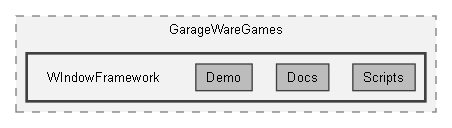
Directories | |
| Demo | |
| Docs | |
| Scripts | |
| Tests | |
Detailed Description
Window Framework for UI Toolkit — 2.0.0
Required setup
- Configure the application's WindowFrameController and its linked UIDocument as the single managed windowing layer. Purchasers own document/panel sort order above other application UI.
- Assign valid WindowFrameThemeData, exactly one configured default and required shared stylesheet composition. AllPanels changes styling scope, not window-host authority.
- Inspect actual package references before installation: runtime currently references Input System, Addressables and ResourceManager; source feature guards alone do not certify Addressables-free import.
- Give remembered concrete windows stable ParentObjectId and WindowId before attachment. Application content/input/resource ownership remains with its consumer.
- Modern theme appearance is packaged per folder: entry TSS, one settings USS, preview, Icons and Cursors. Stock folders are under Resources/WindowFramework/Themes/v2.0/<ThemeName>/. Theme Studio Create/Upgrade produces owned folders, Duplicate copies their full contents, and Save copies externally selected supported artwork/previews into the theme. Shared application sheets remain configured once on the collection; do not copy global artwork references and call the result independent.
- See ThemeSaveDuplicateUpgrade.dox for folder-copy, registration, source preservation and supported-dependency limits. Runtime JSON Copy remains a separate existing workflow.
Purchaser manual
Start at WindowFrameworkUserManual.dox. It links the Doxygen source chapters for installation, windows, geometry, tabs, modal cards, tooltips, context menus, settings, themes, portable files, editor tools, dependencies and developer APIs. Generated HTML is not required to read those files.
DocumentationCoverageAudit.dox records unfinished documentation and implementation findings separately. Historical design/diagnostic Markdown notes are not current installation instructions. Existing Markdown guide pointers lead to their authoritative Doxygen successors.
Implemented feature areas
- Eight-direction window resizing, movement, magnetic snapping and programmatic docking. Window permission flags and viewport/layout limits apply.
- Tab nesting and host/guest tear-off with active-content/footer following. Saved workspace reconstruction has concrete-type, identity and recorded-field limits; not every live state is universally restart-restored.
- Runtime tooltip/context-menu controls, lifecycle guards and configured appearance. Context-menu placement behavior is unchanged by the documentation audit.
- Card queues and ordinary modal windows in the assigned windowing root. Application gameplay/input cancellation remains consumer-owned.
- Theme Manager/Studio preview, root settings editing, collection composition, duplication and legacy upgrade. Source/preview/import/metadata operations have distinct stages and preservation limits.
- Portable player themes use bounded validated JSON/raster files and configured prepared defaults. Stable identity, recoverable supported-field issues and explicit resource leases do not imply arbitrary USS or visual-selector cloning.
- Compiled data/recovery/image extension handlers with staged export and reversible application. Supplied inventory/image/hotbar handlers are examples, not gameplay systems.
- Vector asset capability gating and asynchronous compiled-vector Copy preparation. No player-provided SVG execution or universal version/platform guarantee.
- Optional Visual Scripting preview units and a Custom Event bridge for existing windows, shipped theme selection and overlays. Graph exit/request flags are not application-completion certificates.
- Controller debugger and filtered telemetry. Diagnostic output uses Unity logs; not every method/callsite is eliminated without the instrumentation define.
Demonstrations and support boundaries
Demo code illustrates configured content and callbacks. It contains known sample limitations, historical menu references and diagnostic fixtures; do not copy it as a universal production controller. Experimental scripts are explicitly not ready for production. Existing test counts/logs are evidence, not proof of full commercial acceptance. No new runtime/build acceptance is implied by this README.
Links
- Documentation portal: http://www.garage-ware.com/window-framework-for-ui-toolkit
- Unity Asset Store: https://assetstore.unity.com/packages/slug/320840
- Videos: https://www.youtube.com/@GarageWareGames
- Support: https://www.garage-ware.com/support
External availability was not checked during the file-writing task. CHANGELOG.md retains release/development history and is referenced by demo page data. Historical entries can describe superseded iterations; use the linked Doxygen manual for current setup and API contracts.