Represents a customizable window frame for UI elements in Unity. Provides functionality for resizing, moving, locking, and saving window state. Includes support for themes, tooltips, and context menus. More...


Public Member Functions | |
| WindowFrame () | |
| Represents a custom UI element serving as a container for window-based content, including a header, content, and footer, providing event handling and theme adaptability for Unity's UI Toolkit. | |
| void | CloseWindow (bool forceAll=false) |
| Closes the window if allowed. | |
| void | DockTab (WindowFrame incoming) |
| Docks an incoming standalone WindowFrame into this window as a nested tab. | |
| void | DockTo (WindowDockState targetState) |
| Applies the specified programmatic dock geometry, preserving initial floating bounds. | |
| void | ExitFullscreenToCursor (Vector2 cursorPos) |
| Exits fullscreen mode and pre-positions the restored floating window centered horizontally under the cursor. | |
| void | Hide () |
| Hides the window while keeping it in memory. | |
| void | SetOpeningPosition () |
| Sets the opening position of the window based on the selected position. Options include: TopLeft, Top, TopRight, Left, Center, Right, BottomLeft, Bottom, BottomRight. | |
| void | Show () |
| Shows the window by setting its display style to flex and opacity to 1.0f. | |
| void | SwitchToTab (int index) |
| Switches the active view to display the specified nested tab's content. | |
| void | Undock (Vector2? cursorPos=null) |
| Undocks the window frame, restoring its pre-dock floating size and positioning. | |
| WindowFrame | UndockTab (int index, Vector2? mousePos=null) |
| Undocks a nested tab back into an independent standalone WindowFrame. | |
Properties | |
| bool | Active [get, set] |
| Gets or sets whether the window is active. | |
| int | ActiveTabIndex [get] |
| Gets the current tab-selection index; interpret against the current live tab list. | |
| bool | AllowClose = true [get, set] |
| Gets or sets whether the window can be closed. | |
| bool | AllowFullscreen = true [get, set] |
| Determines whether the window frame can toggle to fullscreen mode. | |
| bool | AllowLock [get, set] |
| Gets or sets whether the window can be locked. | |
| bool | AllowMove = true [get, set] |
| Gets or sets whether the window can be moved. | |
| bool | AllowMultipleInstances = true [get, set] |
| Gets or sets whether multiple instances of this window are allowed. | |
| bool | AllowResize [get, set] |
| Gets or sets whether the window can be resized. | |
| bool | AllowTabDocking = true [get, set] |
| Gets or sets whether this window can participate in tabbed window nesting and docking. | |
| VisualElement | Content [get, set] |
| Gets or sets the content area of the window. | |
| override VisualElement | contentContainer [get] |
| Overrides the contentContainer to return the window's content area instead of the root. | |
| ContextMenuConfig | ContextMenuConfig [get, set] |
| Gets or sets the context menu configuration for this window. | |
| float | DefaultHeight [get, set] |
| float | DefaultWidth [get, set] |
| WindowDockState | DockState [get, set] |
| Gets/sets docking metadata; assignment alone does not reposition or resize this window. | |
| WindowFrameDragger | Dragger [get] |
| Gets the installed header dragger, which can be null before scheduled setup. | |
| VisualElement | FooterToolbar [get, set] |
| Gets or sets the toolbar in the footer area of the window. | |
| bool | Fullscreen [get, set] |
| Gets or sets whether the window is in fullscreen mode. | |
| bool | Locked [get, set] |
| Gets or sets whether the window is locked. | |
| bool | LockedFullscreen [get, set] |
| Determines whether the fullscreen mode of the window is locked, preventing the user from toggling fullscreen on or off. | |
| bool | LockedToStartPosition [get, set] |
| Gets or sets whether the window is locked to its start position. | |
| float | MinHeight [get, set] |
| Gets or sets the minimum height of the window. | |
| float | MinWidth [get, set] |
| Gets or sets the minimum width of the window. | |
| IReadOnlyList< WindowTabEntry > | NestedTabs [get] |
| Gets the live nested-tab list through a read-only interface, not an independent snapshot. | |
| string | OptionsMenuTooltip [get, set] |
| Gets or sets the tooltip for the options menu button. | |
| string | ParentObjectId [get, set] |
| Gets or sets the ID of the parent object associated with the window. | |
| Rect | PreDockRect [get, set] |
| Gets/sets floating restore bounds in parent layout coordinates. | |
| string | ResizeAreaTooltip [get, set] |
| Gets or sets the tooltip for the resize area. | |
| bool | ShowFooter [get, set] |
| Gets or sets whether the footer is visible. | |
| bool | ShowHeader [get, set] |
| Gets or sets whether the header is visible. | |
| WindowFramePosition | StartPosition [get, set] |
| Gets or sets the position of the window frame. | |
| List< StyleSheet > | StyleSheet [get, set] |
| Gets or sets the stylesheet applied to the window. | |
| string | Title [get, set] |
| Gets or sets the title of the window. | |
| string | WindowId [get, set] |
| Gets or sets the unique ID of the window. | |
| bool | WindowMemoryEnabled = false [get, set] |
| Gets or sets whether the window memory is enabled. | |
Events | |
| static Action< WindowFrame > | OnWindowFrameAdded |
| Event triggered when a new WindowFrame is added to the panel. | |
| static Action< WindowFrame > | OnWindowFrameRemoved |
| Event triggered when a WindowFrame is removed from the panel. | |
Private Member Functions | |
| void | ApplyControllerTheme (List< StyleSheet > newTheme, List< StyleSheet > oldTheme) |
| Applies controller-owned sheets, or records them until ordinary runtime attachment. | |
| void | ApplyOpeningPosition () |
| Submits the existing nine-position calculation without revealing the window. | |
| void | Close () |
| Performs complete window closure and cleanup. | |
| void | CompleteOpeningGeometry () |
| Applies ordinary runtime restoration/placement after the first styled layout. | |
| ContextMenuConfig | ContextMenuDefaultConfig () |
| Creates the default context menu configuration with standard window operations. | |
| void | CreateLayout () |
| Creates the basic layout structure of the window by adding header, sub-header tab bar, content, and footer. | |
| void | CreatePerimeterResizeHandles () |
| Creates and attaches the 8 perimeter edge and corner resize handles to the window frame. | |
| VisualElement | CreateTabButton (WindowTabEntry entry, int index) |
| void | GeometryChangeCallback (GeometryChangedEvent evt) |
| Called whenever a change in the window geometry occurs. | |
| bool | HandleMultipleInstanceCheck () |
| Checks if multiple instances are allowed and handles singleton behavior. | |
| bool | InitializeWindowGeometry () |
| Dispatches first-layout initialization to the existing ordinary or immediate path. | |
| void | KeepOnScreen () |
| Ensures the window remains within screen boundaries. | |
| WindowFrameData | LoadWindowData () |
| Reads eligible saved state after styling; never initializes or resets geometry. | |
| void | OnAttachToPanel (AttachToPanelEvent evt) |
| Handles the panel attach event. | |
| void | OnClickEvent (ClickEvent evt) |
| Handles click events on the window for activation. | |
| void | OnDetachFromPanel (DetachFromPanelEvent evt) |
| Handles the panel detach event for proper cleanup. | |
| void | OnOnScreenSizeChanged (GeometryChangedEvent evt) |
| Handles screen size changes by repositioning windows as needed. | |
| void | OnWindowMove () |
| Called when the window is moved, starts a resetable timmer watching for idle and then save the window data. | |
| void | RegisterCallbacks () |
| Registers all necessary event callbacks for window functionality. | |
| System.Collections.IEnumerator | RevealAfterOpeningLayout (bool restoredVisible, double startedAt, Rect beforeRestoration) |
| Continues layout after restoration/placement, then reveals the ordinary window. | |
| void | SaveWindowData () |
| Save window data. | |
| void | SaveWindowData (bool isOpen) |
| Saves the window data to the WindowFrameController. | |
| void | SetFullScreenMode (bool value) |
| Toggles the fullscreen mode for the window frame. | |
| void | SetHeaderFade () |
| Updates header visual appearance based on active state. | |
| void | UnregisterCallbacks () |
| Unregisters all event callbacks to prevent memory leaks. | |
| void | UpdatePerimeterResizeHandles (bool visible) |
| Synchronizes the visibility and interactability of all perimeter resize handles. | |
| void | UpdateTheme (List< StyleSheet > newTheme, List< StyleSheet > oldTheme) |
| Updates the theme stylesheet for the windows in the system. | |
| async void | WaitForIdle () |
| Waits for the window to not be moving for 2 seconds before saving the window data. | |
| VisualElement | WindowFrameContent () |
| Creates the content area of the WindowFrame custom control. | |
| VisualElement | WindowFrameFooter () |
| Generates the Footer portion of a WindowFrame custom control. | |
| VisualElement | WindowFrameHeader () |
| Generates the header portion of a WindowFrame custom control. | |
| VisualElement | WindowFrameTabBar () |
| Creates the sub-header tab bar container used when multiple windows are nested together. | |
Static Private Member Functions | |
| static void | ApplyContentStyles (VisualElement newContentContainer) |
| Applies standard content styling to a container element. | |
| static void | BindThemeCursor (VisualElement element, string token) |
Private Attributes | |
| bool | _active = true |
| Indicates whether the window is currently active/focused. | |
| int | _activeTabIndex = 0 |
| Index of the currently active/visible tab. | |
| bool | _allowLock = true |
| Indicates whether the window can be locked. | |
| bool | _allowResize = true |
| Indicates whether the window can be resized. | |
| IPanel | _cachedPanel |
| VisualElement | _content |
| Content area of the window where main UI elements are placed. | |
| ContextMenuConfig | _contextMenuConfig |
| Configuration for the context menu associated with this window. | |
| bool | _controllerThemePending |
| List< StyleSheet > | _controllerThemeSheets |
| float | _defaultHeight = 300 |
| Gets or sets the stored creation-time height of the window. | |
| float | _defaultWidth = 300 |
| Gets or sets the stored creation-time width of the window. | |
| WindowDockState | _dockState = WindowDockState.Floating |
| The current screen dock state of the window. | |
| WindowFrameDragger | _dragger |
| Manipulator handling window drag operations. | |
| VisualElement | _footer |
| Footer area of the window containing toolbar and resize handle. | |
| VisualElement | _footerToolbar |
| Toolbar element in the footer area. | |
| VisualElement | _footerToolbarArea |
| Container for the footer toolbar. | |
| bool | _fullScreen |
| Indicates whether the window is in fullscreen mode. | |
| VisualElement | _header |
| Header area of the window containing title and controls. | |
| float | _lastMoveTime |
| Timestamp of the last window move operation. | |
| Vector2 | _lastPosition |
| Last recorded position of the window for change detection. | |
| Vector2 | _lastSize |
| Last recorded size of the window for change detection. | |
| bool | _locked |
| Indicates whether the window is currently locked. | |
| bool | _lockedFullScreen = false |
| Whether fullscreen mode is locked and cannot be changed. | |
| bool | _lockedToStartPosition = false |
| Whether the window is locked to its start position. | |
| VisualElement | _lockIndicator = new Button() |
| Button indicator for locking/unlocking the window. | |
| float | _minHeight = 50 |
| Minimum height of the window in pixels. | |
| float | _minWidth = 50 |
| Minimum width of the window in pixels. | |
| readonly List< WindowTabEntry > | _nestedTabs = new List<WindowTabEntry>() |
| Ordered list of nested tabs currently docked inside this window frame. | |
| bool | _openingMemoryGeometry |
| Guards ordinary hidden opening geometry until the reveal continuation completes. | |
| bool | _openingStylesApplied |
| VisualElement | _optionsMenu = new Button() |
| Button for opening the options menu. | |
| bool | _origAllowMove |
| Original value of the allow move flag before fullscreen. | |
| bool | _origAllowResize |
| Original value of the allow resize flag before fullscreen. | |
| float | _origBorderBLRadius |
| Original bottom-left border radius value before fullscreen. | |
| float | _origBorderBRRadius |
| Original bottom-right border radius value before fullscreen. | |
| float | _origBorderTLRadius |
| Original top-left border radius value before fullscreen. | |
| float | _origBorderTRRadius |
| Original top-right border radius value before fullscreen. | |
| float | _origHeight |
| Original height before fullscreen mode. | |
| float | _origWidth |
| Original width before fullscreen mode. | |
| float | _origX |
| Original X position before fullscreen mode. | |
| float | _origY |
| Original Y position before fullscreen mode. | |
| bool | _overrideStartPosition |
| Indicates whether to override the default start position. | |
| string | _parentObjectId |
| ID of the parent object associated with the window. | |
| List< StyleSheet > | _pendingControllerTheme |
| List< StyleSheet > | _pendingOldControllerTheme |
| readonly List< VisualElement > | _perimeterResizeHandles = new List<VisualElement>() |
| Collection of perimeter edge and corner resize handles for 8-directional resizing. | |
| Rect | _preDockRect |
| Pre-dock floating bounds preserved for tear-off / undock restoration. | |
| VisualElement | _resizeArea = new VisualElement() |
| Area for resizing the window, typically in the bottom-right corner. | |
| Color | _resolvedHeaderBgColor |
| The resolved background color for the active header state. | |
| Color | _resolvedHeaderBgColorInactive |
| The resolved background color for the inactive header state. | |
| WindowFramePosition | _selectedPosition = WindowFramePosition.TopLeft |
| Initial positioning preference for the window. | |
| bool | _showFooter = true |
| Indicates whether the footer is visible. | |
| bool | _showHeader = true |
| Indicates whether the header is visible. | |
| List< StyleSheet > | _styleSheet |
| List of stylesheets applied to the window. | |
| VisualElement | _tabBar |
| Dedicated sub-header tab bar element shown when multiple windows are nested together. | |
| VisualElement | _tabContainer |
| Container holding the visual tab items inside the tab bar. | |
| string | _title = "Window Title" |
| Title of the window displayed in the header. | |
| Label | _titleLabel = new Label() |
| Label displaying the window title in the header. | |
| bool | _waitingForIdle |
| Indicates whether the window is waiting for idle state before saving data. | |
Static Private Attributes | |
| static readonly CustomStyleProperty< Color > | s_CustomColor = new("--windowFrame__header-background-color") |
| Custom style property for header background color theming. | |
Detailed Description
Represents a customizable window frame for UI elements in Unity. Provides functionality for resizing, moving, locking, and saving window state. Includes support for themes, tooltips, and context menus.
WindowFrame is a comprehensive window system that provides desktop-style window functionality including:
- Complete window lifecycle management (create, show, hide, close)
- Drag-and-drop window movement with boundary constraints
- Resizable windows with configurable size limits
- Fullscreen toggle with state preservation
- Window locking system to prevent accidental modifications
- Persistent window state across sessions
- Multiple instance management
- Theme integration and custom styling support
- Context menu integration
- Tooltip support throughout the interface
Ordinary runtime creation and opening sequence:
- The constructor creates the header, tab bar, content, footer and resize handles, registers callbacks and keeps the runtime instance hidden. The developer then supplies identity, content, size, position and optional window styles before mounting it through WindowFrameController.AddElement or the existing controller root.
- Attachment reconnects the controller-theme subscription. The configured theme scope determines whether controller sheets belong on this window or are inherited from its panel. Pending controller sheets and the assigned window sheets are applied at attachment, before the first geometry continuation. Existing ancestor sheets may already participate in styling.
- The one-shot GeometryChangedEvent callback receives the first calculated layout and calls InitializeWindowGeometry. Ordinary runtime windows proceed to CompleteOpeningGeometry; they do not receive another DefaultWidth/DefaultHeight or fullscreen initialization there.
- Eligible saved state restores size, opacity and intended visibility. Saved coordinates are used unless an explicit position override already owns placement. With no eligible record, the existing StartPosition calculation is used when its policy applies; otherwise the supplied position is retained. Restoration is the placement stage, not a prelude to repositioning that overwrites saved coordinates. Missing data does not reset styled dimensions or opacity.
- The existing controller runs RevealAfterOpeningLayout, which yields twice to allow the resulting layout to calculate, then applies the intended visibility and activates the window. If the window has no panel at that continuation, it exits without revealing.
While this opening sequence is in progress, the opening-memory guard prevents saving intermediate geometry, bounds correction and public scheduled positioning from revealing or repositioning the initializing window. WindowMemoryEnabled=false performs no per-window saved-state lookup. Later theme changes use the same existing sheet application methods, not another opening initialization or a default-size reset.
Explicit DefaultWidth/DefaultHeight assignments while detached write inline dimensions and retain normal UI Toolkit precedence over USS. Their stored initial values alone do not impose a physical 300-by-300 runtime rectangle. Editor initialization and controller-owned modal presentation are separate paths; modal cards are content, not independently opening ordinary windows.
Constructor & Destructor Documentation
◆ WindowFrame()
|
inline |
Represents a custom UI element serving as a container for window-based content, including a header, content, and footer, providing event handling and theme adaptability for Unity's UI Toolkit.
The constructor performs comprehensive initialization including:
- Multiple instance checking (if AllowMultipleInstances is false)
- Editor/runtime visibility configuration
- Basic styling and layout setup
- Event callback registration
- Theme integration and tooltip application
Runtime construction is hidden; Editor preview outside Play Mode is visible. The existing inline 20-unit minimum dimensions and absolute positioning are retained. CreateLayout builds the child structure, and RegisterCallbacks publishes the construction notification and registers the one-shot first-layout initializer. Developer constructor or object-initializer settings are supplied before mounting; they must not be reinitialized after styling. A controller theme request here is queued for ordinary runtime attachment. MarkDirtyRepaint requests a repaint; it does not synchronously calculate resolved layout. Attachment, saved-state restoration/placement and reveal are described in the class remarks.


Member Function Documentation
◆ ApplyContentStyles()
|
inlinestaticprivate |
Applies standard content styling to a container element.
- Parameters
-
newContentContainer The container to apply styling to
Configures the container for flexible vertical layout with proper overflow handling. Ensures consistent content area behavior across all windows.

◆ ApplyControllerTheme()
|
inlineprivate |
Applies controller-owned sheets, or records them until ordinary runtime attachment.
- Parameters
-
newTheme New controller composition; null removes the tracked local composition. oldTheme Previously published controller sheets to remove from this window.
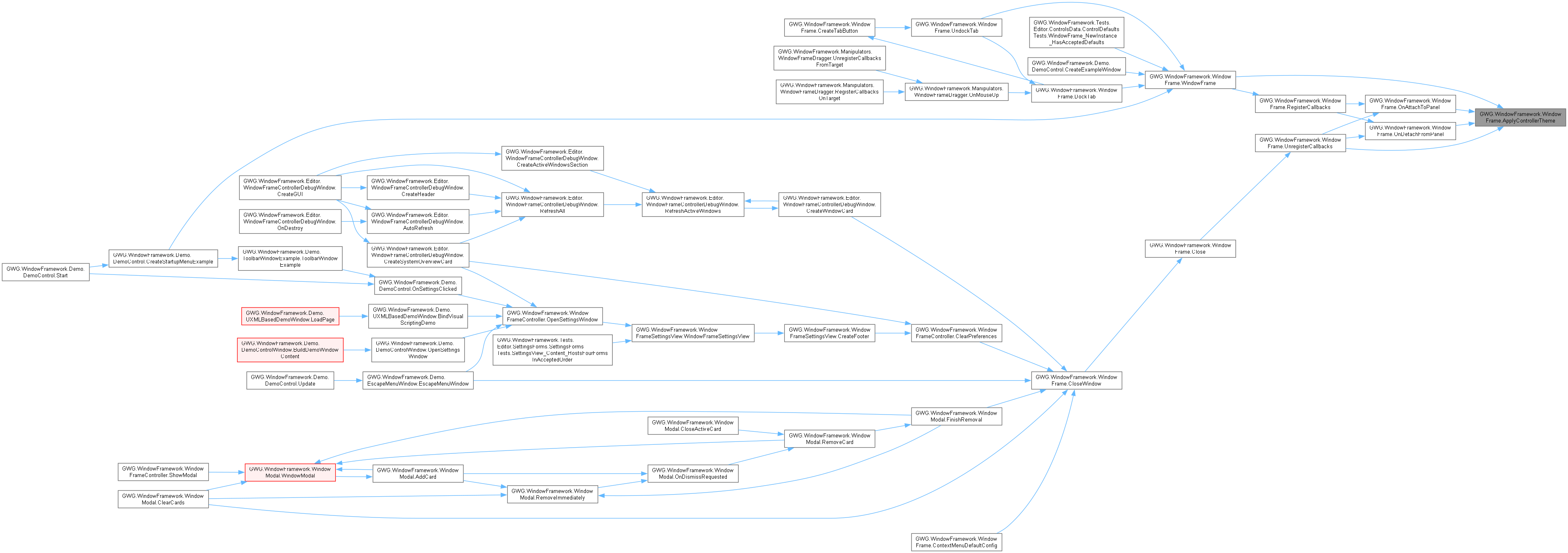
Before ordinary runtime opening styles are ready, copies the supplied lists into the existing pending fields without applying them. OnAttachToPanel marks styles ready before consuming those fields, so the same method performs the actual sheet changes there. Editor and modal-owned calls are not deferred. Subsequent controller notifications remove the published old sheets and the previously tracked local controller sheets, install the new composition and retain its references. This does not clear arbitrary purchaser sheets, write dimensions, restore memory or wait for layout. Panel scopes publish a null local composition because the controller installs their sheets on the panel visual tree.

◆ ApplyOpeningPosition()
|
inlineprivate |
Submits the existing nine-position calculation without revealing the window.
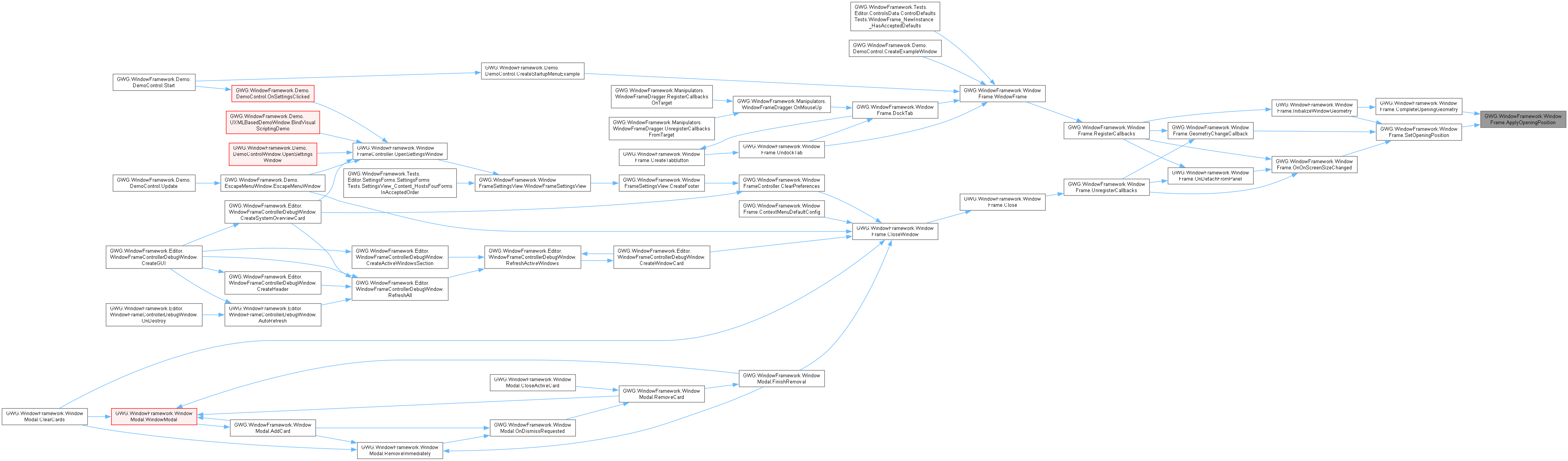
Uses Screen.width/height and this window's current calculated layout size to assign left/top, then marks repaint. CompleteOpeningGeometry invokes it only when no eligible record exists and the existing position policy requires it. A restored record is not followed by this calculation. SetOpeningPosition is the separate public scheduled wrapper, with its own modal/opening/explicit-position guards and visibility behavior. No new alignment, docking, coordinate polling or default sizing is performed here.
◆ BindThemeCursor()
|
inlinestaticprivate |


◆ Close()
|
inlineprivate |
Performs complete window closure and cleanup.
Handles the full window closure process including:
- Unregistering all event callbacks
- Removing from UI hierarchy
- Saving final state as closed
- Updating WindowFrameController active window state Called internally after permission checks in CloseWindow().


◆ CloseWindow()
|
inline |
Closes the window if allowed.
- Parameters
-
forceAll Forces closure regardless of permissions when true
Respects AllowClose and Locked unless forceAll is true, for this instance only. Performs registered framework callback teardown, detaches, requests closed-state saving and clears controller activation. Requires the existing controller; callback teardown is not disposal of every application subscription/resource. Unlike Hide or reparenting, Close removes attach handling, so Show alone does not recreate a closed instance's wiring. Construct a fresh concrete window through the application lifecycle when reopening. No return value certifies persistence, layout or a business operation.


◆ CompleteOpeningGeometry()
|
inlineprivate |
Applies ordinary runtime restoration/placement after the first styled layout.
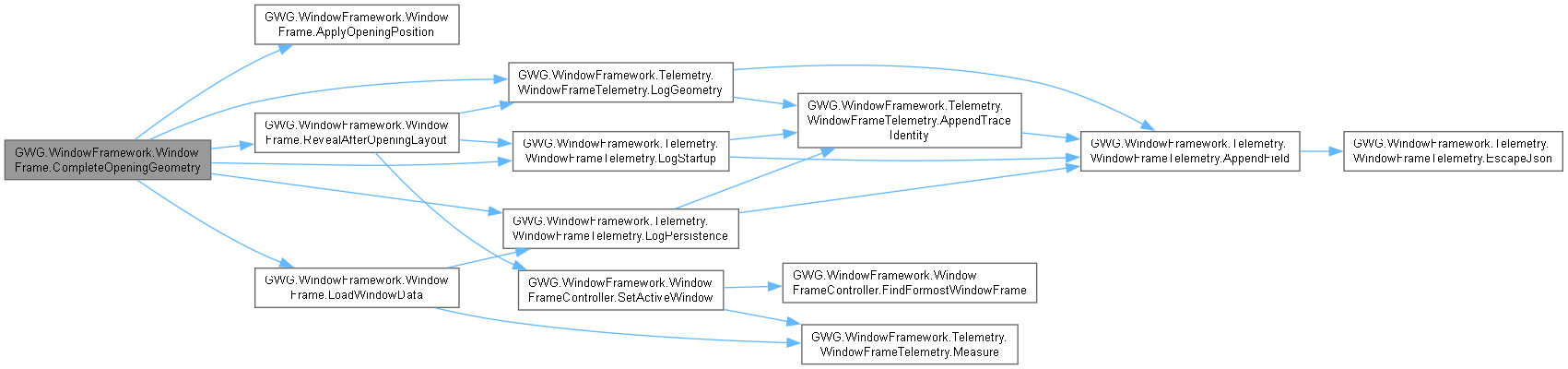
Called from InitializeWindowGeometry, not from a repeated geometry polling loop. Reads memory only when enabled and not locked to StartPosition. A record supplies size and opacity; its visibility is retained for reveal rather than exposing the window now. Saved coordinates are applied only when no explicit position override owns them. Without a record, ApplyOpeningPosition runs when no override exists or StartPosition is locked; otherwise the supplied position remains. No default width, height or opacity reset occurs in this path. Finally starts RevealAfterOpeningLayout on the existing controller when available. This method does not create a controller, save a hidden window or perform a second placement after restoring saved coordinates.

◆ ContextMenuDefaultConfig()
|
inlineprivate |
Creates the default context menu configuration with standard window operations.
- Returns
- ContextMenuConfig with fullscreen, lock, and close options
Provides a standard context menu with common window operations. Each item includes appropriate visibility and enabled logic based on window permissions. Serves as an example for creating custom context menu configurations.

◆ CreateLayout()
|
inlineprivate |
Creates the basic layout structure of the window by adding header, sub-header tab bar, content, and footer.
Establishes the window structure in the correct hierarchical Order. Each section is created and configured for its specific purpose.


◆ CreatePerimeterResizeHandles()
|
inlineprivate |
Creates and attaches the 8 perimeter edge and corner resize handles to the window frame.
Enables 8-directional edge and corner resizing (Left, Right, Top, Bottom, and Corners). Handles are positioned absolutely along the boundary and added directly to VisualElement.hierarchy so they overlay the perimeter without interfering with the internal header, content, and footer flow.


◆ CreateTabButton()
|
inlineprivate |

◆ DockTab()
|
inline |
Docks an incoming standalone WindowFrame into this window as a nested tab.
- Parameters
-
incoming Existing standalone window whose content and footer are transferred, not cloned.
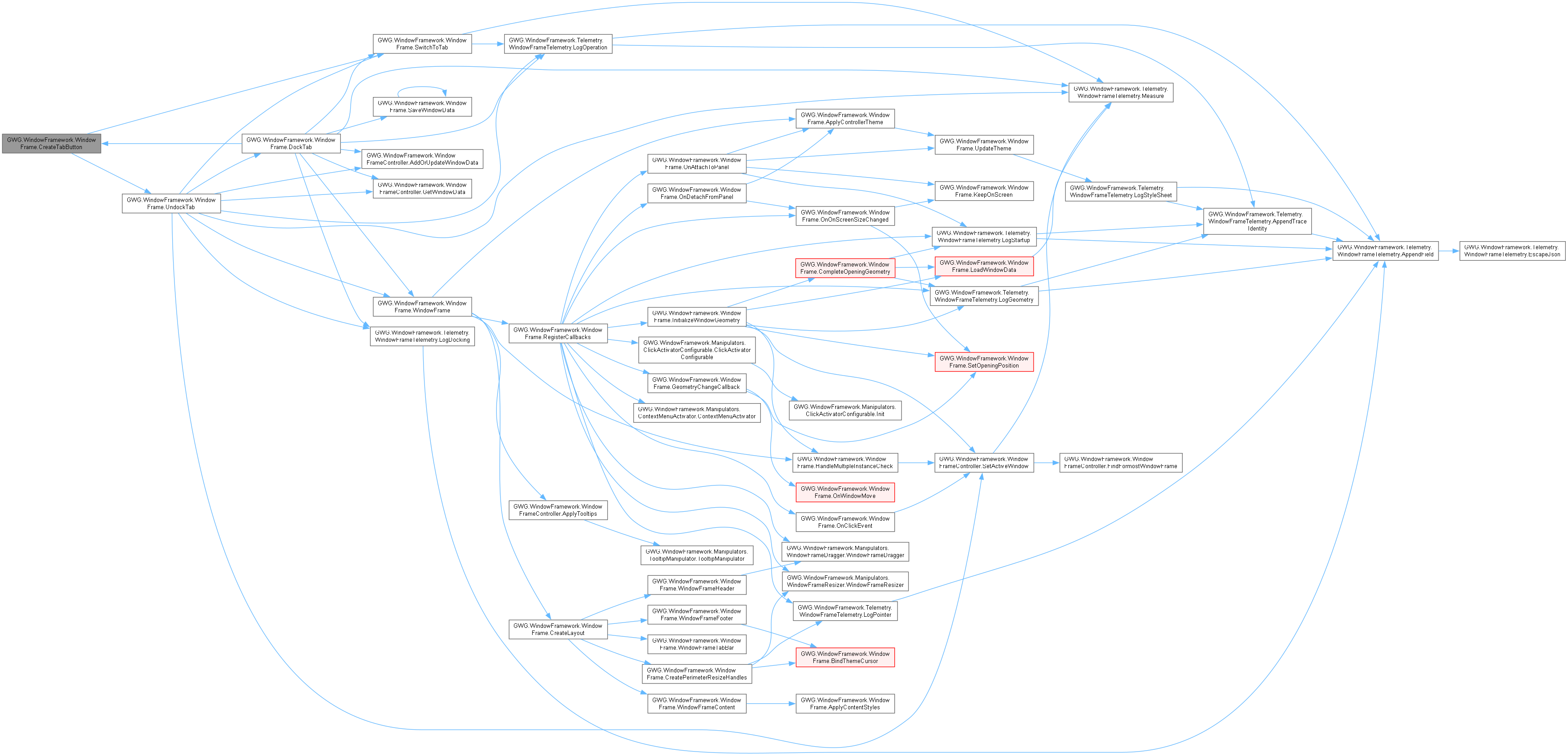
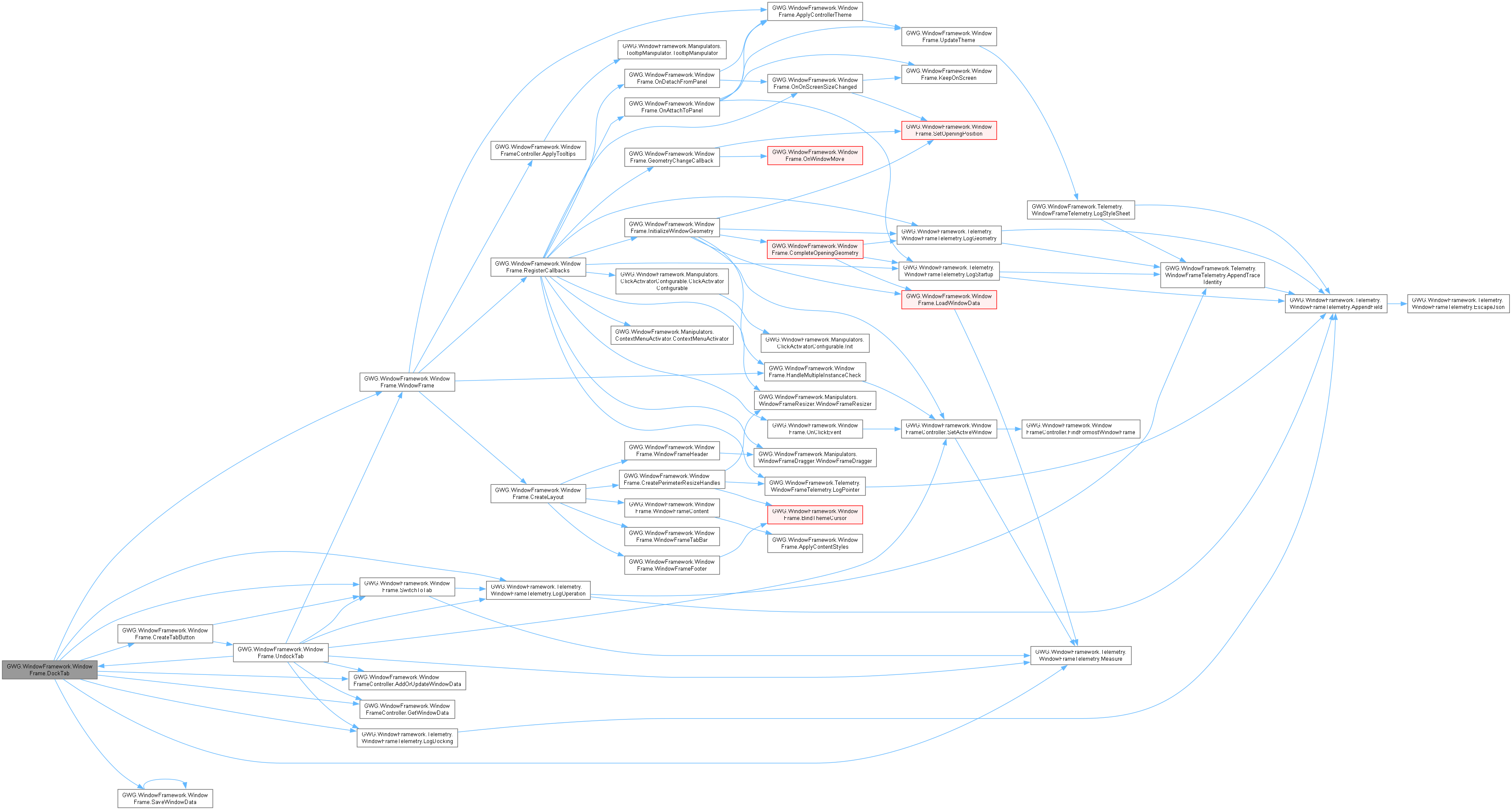
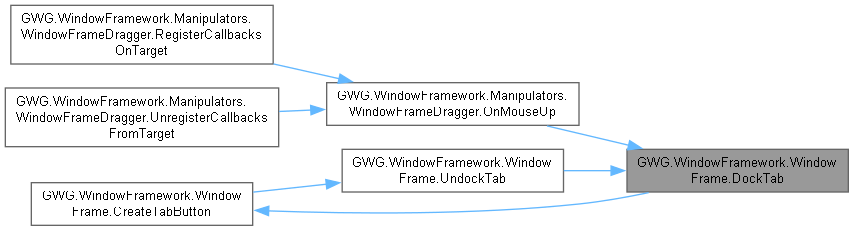
Null, self and either window's AllowTabDocking=false are rejected without changes. Direct invocation does not consult the global gesture preference or ordinary close permission. First docking wraps the host's existing content as tab zero. Incoming content children are reparented into a new wrapper; its SourceWindow remains retained and is detached from the hierarchy. Detach-driven application resources must tolerate that ownership transition. Updates an existing guest memory record's host key when available, activates the new tab and schedules host saving. Does not construct application content or dispose the guest.
◆ DockTo()
|
inline |
Applies the specified programmatic dock geometry, preserving initial floating bounds.
- Parameters
-
targetState Supported dock enum; Floating delegates to Undock.
Direct call does not check global gesture preferences, AllowMove or Locked. It uses parent resolved size, falling back to Screen dimensions when unavailable. Call after attached layout for scaled-panel geometry. Half/maximized rectangles are applied inline; this does not set Fullscreen, perform an immediate save or clamp every size against application minimums. Unsupported enum values change metadata without a matching rectangle branch.

◆ ExitFullscreenToCursor()
|
inline |
Exits fullscreen mode and pre-positions the restored floating window centered horizontally under the cursor.
- Parameters
-
cursorPos Pointer coordinates in the window parent's layout space.
No-op unless fullscreen and neither LockedFullscreen nor Locked. Restores retained size and places it horizontally under the pointer with a 15-unit header offset. Left/top clamp to zero; this method alone does not fully clamp right/bottom, start mouse capture, save immediately or establish application drag permission. The dragger owns handoff.

◆ GeometryChangeCallback()
|
inlineprivate |
Called whenever a change in the window geometry occurs.
- Parameters
-
evt The geometry change event data
Handles window geometry changes by tracking position and size changes. Implements idle detection to avoid excessive save operations during continuous movement. Respects LockedToStartPosition setting by resetting position when needed.


◆ HandleMultipleInstanceCheck()
|
inlineprivate |
Checks if multiple instances are allowed and handles singleton behavior.
- Returns
- True if window should continue initialization, false if it should be destroyed
When AllowMultipleInstances is false, searches for existing instances of the same type. If found, activates the existing instance and marks the new one for destruction. Only performs check during runtime to avoid editor issues.


◆ Hide()
|
inline |
Hides the window while keeping it in memory.
Removes the window from layout while retaining the instance/hierarchy for ordinary windows. When ModalPresentationOwned is true, asks the controller to release that modal presentation before setting display None and visible false. Schedules remembered hidden state; does not dispose application resources or perform the complete CloseWindow callback teardown.

◆ InitializeWindowGeometry()
|
inlineprivate |
Dispatches first-layout initialization to the existing ordinary or immediate path.
- Returns
- False when the multiple-instance check rejects this instance; otherwise true.
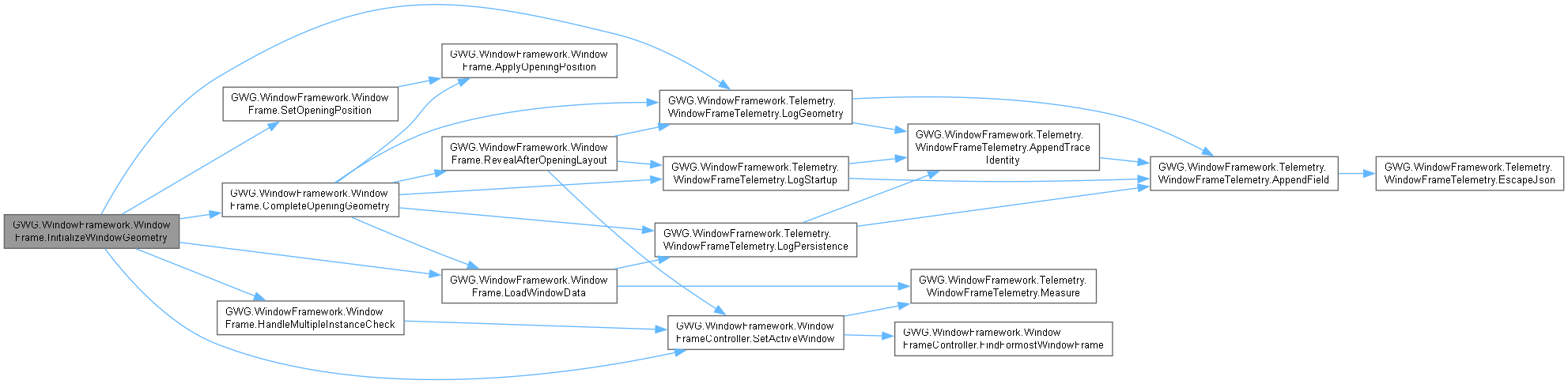
The one-shot GeometryChangedEvent callback calls this after attachment and initial layout. Ordinary runtime windows call CompleteOpeningGeometry and return before all lower fallback/default/fullscreen writes. The remaining immediate path belongs to Editor or ModalPresentationOwned initialization: it retains eligible memory handling, opacity/fullscreen and default fallback logic plus scheduled activation. Controller-owned modal presentation controls its own launch/reveal; do not treat that path or its card content as ordinary opening.

◆ KeepOnScreen()
|
inlineprivate |
Ensures the window remains within screen boundaries.
Adjusts window position to prevent it from moving off-screen. Handles all four screen edges and maintains window visibility. Called automatically during positioning operations.

◆ LoadWindowData()
|
inlineprivate |
Reads eligible saved state after styling; never initializes or resets geometry.
- Returns
- The controller's record for type, parent object identity and window identity, or null when no record is available or restoration is ineligible.
Requires runtime, WindowMemoryEnabled, an unlocked StartPosition, a controller and, for an ordinary window, completed opening stylesheet application. Reads only; size, opacity, coordinates and eventual visibility are applied by the initialization caller. Disabled memory performs no controller lookup. No record is fabricated and no default dimensions are written.


◆ OnAttachToPanel()
|
inlineprivate |
Handles the panel attach event.
- Parameters
-
evt The attach event data
Reconnects this instance's controller theme subscription and applies window-local composition when the configured scope requires it. Schedules portable-control refresh and a bounds check. This method does not publish OnWindowFrameAdded; that notification is emitted by RegisterCallbacks during construction, before usable attached geometry.
For initial ordinary runtime attachment, first selects the local controller request: WindowsFramesOnly (or absent theme data) uses CurrentThemeStylesheets; panel scopes use null locally because their sheets are installed by the controller on the panel visual tree. Then sets the opening-memory guard and marks opening styles ready before consuming pending controller lists through ApplyControllerTheme and adding assigned window sheets through UpdateTheme. Setting readiness first prevents those existing calls from requeuing startup application. Inherited ancestor/panel sheets can already affect the window at attachment.
The first geometry callback subsequently handles restoration/placement, followed by the reveal continuation. This method neither restores saved data nor assigns default sizes. Reattachment reconnects themes without repeating the initial guarded stylesheet stage once it is ready. The scheduled KeepOnScreen call respects modal/opening geometry guards.


◆ OnClickEvent()
|
inlineprivate |
Handles click events on the window for activation.
- Parameters
-
evt The click event data
Sets this window as the active window when clicked (except options menu clicks). Only operates during play mode to avoid editor interference. Uses WindowFrameController to properly manage window activation.


◆ OnDetachFromPanel()
|
inlineprivate |
Handles the panel detach event for proper cleanup.
- Parameters
-
evt The detach event data
Triggered when this window itself detaches. Removes its controller-theme subscription, publishes OnWindowFrameRemoved and releases cached panel geometry observation. It does not perform full Close teardown: attach callbacks remain for reparenting and theme reconnection. Caller-owned content subscriptions/resources are not disposed here.


◆ OnOnScreenSizeChanged()
|
inlineprivate |
Handles screen size changes by repositioning windows as needed.
- Parameters
-
evt The geometry change event from the screen/panel
Responds to screen resolution changes or panel size modifications. Updates window position if LockedToStartPosition is true. Ensures windows remain on screen after size changes.


◆ OnWindowMove()
|
inlineprivate |
Called when the window is moved, starts a resetable timmer watching for idle and then save the window data.
Tracks the last move time and initiates idle detection to batch save operations. Prevents excessive saving during continuous window movement operations.


◆ RegisterCallbacks()
|
inlineprivate |
Registers all necessary event callbacks for window functionality.
Sets up comprehensive event handling including:
- Initial geometry setup and data loading
- Ongoing geometry change monitoring
- Window activation/focus handling
- Theme change subscriptions
- Screen size change responses
- Manipulator setup for drag/resize/context menu Uses scheduled execution to ensure proper initialization timing.
The one-shot GeometryChangedEvent callback records the first calculated rectangle and calls InitializeWindowGeometry. This is not a repeating initialization/default-sizing loop. OnWindowFrameAdded is published immediately during this constructor call, before attachment and usable geometry; attachment itself reconnects theme ownership separately. Ongoing geometry, panel-size and interaction callbacks are registered by the existing delayed scheduler. Their save/bounds paths respect the opening guard rather than requiring a save before reveal.


◆ RevealAfterOpeningLayout()
|
inlineprivate |
Continues layout after restoration/placement, then reveals the ordinary window.
- Parameters
-
restoredVisible Saved visibility, or true when no eligible record was found. startedAt Existing startup telemetry timestamp for this opening stage. beforeRestoration Earlier layout retained only for diagnostic comparison.
- Returns
- The coroutine hosted by the existing WindowFrameController.
Two yield-return-null continuations allow subsequent Unity frames to calculate the submitted geometry. They are not wall-clock waits, repeated stable-size checks or an arbitrary render-fence guarantee. If panel is null afterward, exits without revealing or clearing the opening guard. Otherwise applies intended visibility, clears the guard, logs the current layout and requests activation through the existing controller. Does not write dimensions, reposition, save state or restart theme application.


◆ SaveWindowData() [1/2]
|
inlineprivate |
Save window data.
Convenience method that saves window data with current visibility state. Uses the more detailed SaveWindowData(bool) method internally.


◆ SaveWindowData() [2/2]
|
inlineprivate |
Saves the window data to the WindowFrameController.
- Parameters
-
isOpen Whether the window is currently open
Saves comprehensive window state including position, size, visibility, lock state, and other properties. Only saves if WindowMemoryEnabled is true and proper identification is available. Creates a unique data KeyValue combining type, parent ID, and window ID.

◆ SetFullScreenMode()
|
inlineprivate |
Toggles the fullscreen mode for the window frame.
- Parameters
-
value A boolean indicating whether to enable or disable fullscreen mode.
Manages fullscreen state by storing original dimensions and settings. Temporarily disables resize and move capabilities in fullscreen mode. Restores original state when exiting fullscreen. Respects AllowFullscreen, Locked, and LockedFullscreen properties.

◆ SetHeaderFade()
|
inlineprivate |
Updates header visual appearance based on active state.
Applies different opacity levels to provide visual feedback about window focus:
- Active windows: Full opacity (1.0)
- Inactive windows: Reduced opacity (0.7) Helps users identify which window currently has focus.
◆ SetOpeningPosition()
|
inline |
Sets the opening position of the window based on the selected position. Options include: TopLeft, Top, TopRight, Left, Center, Right, BottomLeft, Bottom, BottomRight.
Calculates window position based on screen dimensions and window size. Respects LockedToStartPosition and _overrideStartPosition settings. Uses scheduled execution to ensure layout calculations are complete.


◆ Show()
|
inline |
Shows the window by setting its display style to flex and opacity to 1.0f.
Sets display to Flex, visible to true and opacity to one on this existing instance. It does not mount a detached window or complete opening geometry synchronously. Modal ownership/input gates can still restrict interaction. Read resolved layout after a layout pass, not immediately from this call. Schedules SaveWindowData through the element scheduler.

◆ SwitchToTab()
|
inline |
Switches the active view to display the specified nested tab's content.
- Parameters
-
index Zero-based live tab index; invalid values leave state unchanged.
Updates active index, title and selected classes; inactive wrappers stay attached with display None. Reparents the active entry's footer into the visible footer toolbar and applies that entry's footer visibility. Hidden tab content is not detached/disposed by this operation. It does not itself invoke SaveWindowData; persistence depends on other save paths.


◆ Undock()
|
inline |
Undocks the window frame, restoring its pre-dock floating size and positioning.
- Parameters
-
cursorPos Optional cursor position to anchor the restored window.


◆ UndockTab()
|
inline |
Undocks a nested tab back into an independent standalone WindowFrame.
- Parameters
-
index Index of the tab to undock. mousePos Optional cursor position to place the restored window.
- Returns
- Retained source window, a fallback bare WindowFrame when absent, or null for invalid index.
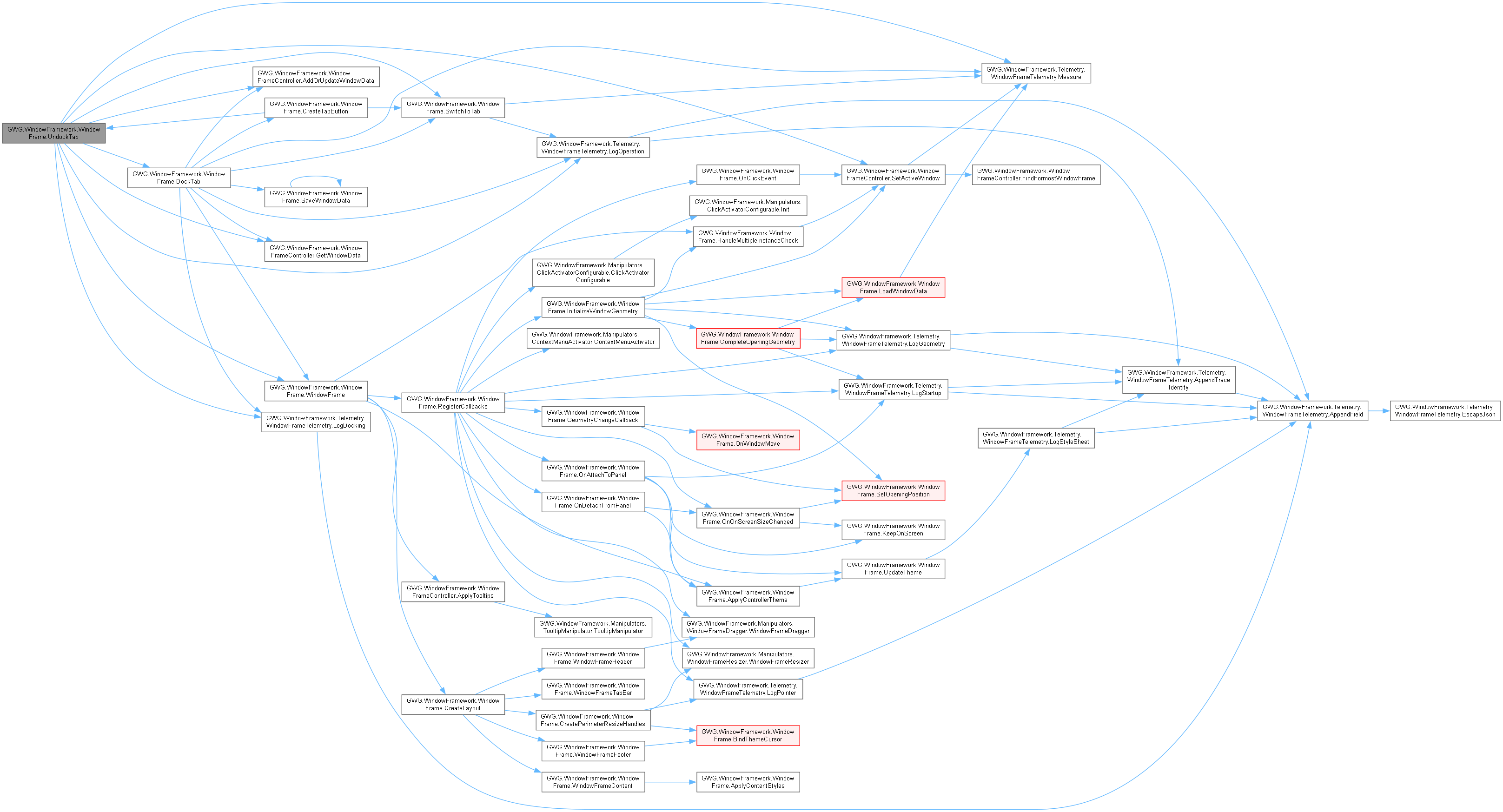
Undocking does not close or destroy tab content. Guest children/footer move back to their source window. Removing the original host tab promotes another source window to retain the group. An optional pointer position sets opening placement; geometry can settle later and the guest reveal is scheduled. Requires a controller root or usable parent to mount. This direct method does not recheck AllowTabDocking/Locked/AllowClose. The tab's X button calls this operation, so it means detach, not a business cancellation or CloseWindow.

◆ UnregisterCallbacks()
|
inlineprivate |
Unregisters all event callbacks to prevent memory leaks.
Removes all registered event callbacks including:
- Geometry change callbacks
- Click events
- Panel detach events
- Theme change subscriptions
- Screen size change callbacks Essential for proper cleanup and memory management.


◆ UpdatePerimeterResizeHandles()
|
inlineprivate |
Synchronizes the visibility and interactability of all perimeter resize handles.
- Parameters
-
visible True if resizing is allowed and handles should be active.
◆ UpdateTheme()
|
inlineprivate |
Updates the theme stylesheet for the windows in the system.
- Parameters
-
newTheme The new stylesheet to apply oldTheme The old stylesheet to remove
Removes only supplied old references that are present locally, then adds non-null new references in supplied order and marks repaint. It does not clear the entire stylesheet collection, remove inherited panel sheets, write inline dimensions or synchronously wait for layout. Startup calls are ordered by OnAttachToPanel before the first geometry callback; later theme changes reuse this same operation without restarting ordinary opening.


◆ WaitForIdle()
|
inlineprivate |
Waits for the window to not be moving for 2 seconds before saving the window data.
Implements asynchronous idle detection to batch save operations. Waits 1 second of inactivity before saving to avoid excessive file operations. Includes error handling for async operation failures.


◆ WindowFrameContent()
|
inlineprivate |
Creates the content area of the WindowFrame custom control.
- Returns
- VisualElement as the container section of the windowframe
Creates the main content container with appropriate flex layout settings. This is where application content should be placed.


◆ WindowFrameFooter()
|
inlineprivate |
Generates the Footer portion of a WindowFrame custom control.
- Returns
- VisualElement containing the complete window footer
Creates the footer with toolbar area and resize handle. Configured for proper layout and resize functionality.


◆ WindowFrameHeader()
|
inlineprivate |
Generates the header portion of a WindowFrame custom control.
- Returns
- VisualElement containing the complete window header
Creates the header with title label, lock indicator, and options menu. Configured for dragging and proper event handling.


◆ WindowFrameTabBar()
|
inlineprivate |
Creates the sub-header tab bar container used when multiple windows are nested together.

Field Documentation
◆ _active
|
private |
Indicates whether the window is currently active/focused.
◆ _activeTabIndex
|
private |
Index of the currently active/visible tab.
◆ _allowLock
|
private |
Indicates whether the window can be locked.
◆ _allowResize
|
private |
Indicates whether the window can be resized.
◆ _cachedPanel
|
private |
◆ _content
|
private |
Content area of the window where main UI elements are placed.
◆ _contextMenuConfig
|
private |
Configuration for the context menu associated with this window.
◆ _controllerThemePending
|
private |
◆ _controllerThemeSheets
|
private |
◆ _defaultHeight
|
private |
Gets or sets the stored creation-time height of the window.
An explicit assignment while panel is null also writes the inline height. Assign before attachment when a code-supplied initial height is required; inline sizing retains normal precedence over USS. After attachment the setter only stores the value and does not resize the live window. Ordinary runtime opening never reapplies it when saved data is absent. The initial backing value of 300 does not itself assign an inline height. Other existing geometry paths can read this value as a fallback; it is not a new runtime defaults stage.
◆ _defaultWidth
|
private |
Gets or sets the stored creation-time width of the window.
An explicit assignment while panel is null also writes the inline width. Assign before attachment when a code-supplied initial width is required; inline sizing retains normal precedence over USS. After attachment the setter only stores the value and does not resize the live window. Ordinary runtime opening never reapplies it when saved data is absent. The initial backing value of 300 does not itself assign an inline width. Other existing geometry paths can read this value as a fallback; it is not a new runtime defaults stage.
◆ _dockState
|
private |
The current screen dock state of the window.
◆ _dragger
|
private |
Manipulator handling window drag operations.
◆ _footer
|
private |
Footer area of the window containing toolbar and resize handle.
◆ _footerToolbar
|
private |
Toolbar element in the footer area.
◆ _footerToolbarArea
|
private |
Container for the footer toolbar.
◆ _fullScreen
|
private |
Indicates whether the window is in fullscreen mode.
◆ _header
|
private |
Header area of the window containing title and controls.
◆ _lastMoveTime
|
private |
Timestamp of the last window move operation.
◆ _lastPosition
|
private |
Last recorded position of the window for change detection.
◆ _lastSize
|
private |
Last recorded size of the window for change detection.
◆ _locked
|
private |
Indicates whether the window is currently locked.
◆ _lockedFullScreen
|
private |
Whether fullscreen mode is locked and cannot be changed.
◆ _lockedToStartPosition
|
private |
Whether the window is locked to its start position.
◆ _lockIndicator
|
private |
Button indicator for locking/unlocking the window.
◆ _minHeight
|
private |
Minimum height of the window in pixels.
◆ _minWidth
|
private |
Minimum width of the window in pixels.
◆ _nestedTabs
|
private |
Ordered list of nested tabs currently docked inside this window frame.
◆ _openingMemoryGeometry
|
private |
Guards ordinary hidden opening geometry until the reveal continuation completes.
Set during initial runtime attachment. Saving, bounds correction and public positioning consult this guard so intermediate layout cannot overwrite remembered state or reveal/reposition the window. It is not a saved-data record or another sizing policy.
◆ _openingStylesApplied
|
private |
◆ _optionsMenu
|
private |
Button for opening the options menu.
◆ _origAllowMove
|
private |
Original value of the allow move flag before fullscreen.
◆ _origAllowResize
|
private |
Original value of the allow resize flag before fullscreen.
◆ _origBorderBLRadius
|
private |
Original bottom-left border radius value before fullscreen.
◆ _origBorderBRRadius
|
private |
Original bottom-right border radius value before fullscreen.
◆ _origBorderTLRadius
|
private |
Original top-left border radius value before fullscreen.
◆ _origBorderTRRadius
|
private |
Original top-right border radius value before fullscreen.
◆ _origHeight
|
private |
Original height before fullscreen mode.
◆ _origWidth
|
private |
Original width before fullscreen mode.
◆ _origX
|
private |
Original X position before fullscreen mode.
◆ _origY
|
private |
Original Y position before fullscreen mode.
◆ _overrideStartPosition
|
private |
Indicates whether to override the default start position.
◆ _parentObjectId
|
private |
ID of the parent object associated with the window.
◆ _pendingControllerTheme
|
private |
◆ _pendingOldControllerTheme
|
private |
◆ _perimeterResizeHandles
|
private |
Collection of perimeter edge and corner resize handles for 8-directional resizing.
◆ _preDockRect
|
private |
Pre-dock floating bounds preserved for tear-off / undock restoration.
◆ _resizeArea
|
private |
Area for resizing the window, typically in the bottom-right corner.
◆ _resolvedHeaderBgColor
|
private |
The resolved background color for the active header state.
◆ _resolvedHeaderBgColorInactive
|
private |
The resolved background color for the inactive header state.
◆ _selectedPosition
|
private |
Initial positioning preference for the window.
◆ _showFooter
|
private |
Indicates whether the footer is visible.
◆ _showHeader
|
private |
Indicates whether the header is visible.
◆ _styleSheet
|
private |
List of stylesheets applied to the window.
◆ _tabBar
|
private |
Dedicated sub-header tab bar element shown when multiple windows are nested together.
◆ _tabContainer
|
private |
Container holding the visual tab items inside the tab bar.
◆ _title
|
private |
Title of the window displayed in the header.
◆ _titleLabel
|
private |
Label displaying the window title in the header.
◆ _waitingForIdle
|
private |
Indicates whether the window is waiting for idle state before saving data.
◆ s_CustomColor
|
staticprivate |
Custom style property for header background color theming.
Property Documentation
◆ Active
|
getset |
Gets or sets whether the window is active.
Active state affects visual appearance (inactive windows appear dimmed). Only one window should be active at a time. Managed by WindowFrameController.
◆ ActiveTabIndex
|
get |
Gets the current tab-selection index; interpret against the current live tab list.
◆ AllowClose
|
getset |
Gets or sets whether the window can be closed.
When disabled, users cannot close the window through normal means. Can still be closed programmatically with CloseWindow(true).
◆ AllowFullscreen
|
getset |
Determines whether the window frame can toggle to fullscreen mode.
When disabled, users cannot toggle fullscreen through context menu or double-click. The Fullscreen property can still be set programmatically if needed.
◆ AllowLock
|
getset |
Gets or sets whether the window can be locked.
When enabled, users can lock/unlock through context menu or lock indicator. Locked windows cannot be moved, resized, or closed by normal interactions.
◆ AllowMove
|
getset |
Gets or sets whether the window can be moved.
When enabled, users can drag the header to reposition the window. Movement is constrained to keep window within screen bounds. Automatically disabled when locked or in fullscreen mode.
◆ AllowMultipleInstances
|
getset |
Gets or sets whether multiple instances of this window are allowed.
When false, creating a new instance will activate the existing one instead. Useful for singleton windows like settings or main inventory.
◆ AllowResize
|
getset |
Gets or sets whether the window can be resized.
When enabled, users can drag the resize handle to change dimensions. Subject to MinWidth/MinHeight constraints and disabled when locked.
◆ AllowTabDocking
|
getset |
Gets or sets whether this window can participate in tabbed window nesting and docking.
◆ Content
|
getset |
Gets or sets the content area of the window.
The main container where application UI elements should be placed. When set, existing content is removed and tooltips are automatically applied. This is where forms, data displays, and interactive controls go.
◆ contentContainer
|
get |
Overrides the contentContainer to return the window's content area instead of the root.
This ensures that elements added directly to the WindowFrame are placed in the content area rather than the root, maintaining the window's internal structure while providing intuitive behavior.
◆ ContextMenuConfig
|
getset |
Gets or sets the context menu configuration for this window.
If no custom configuration is provided, a default context menu is generated with standard window operations (fullscreen, lock, close). Custom configurations can add application-specific options.
◆ DefaultHeight
|
getset |
◆ DefaultWidth
|
getset |
◆ DockState
|
getset |
Gets/sets docking metadata; assignment alone does not reposition or resize this window.
Use DockTo/Undock for geometry transitions. Arbitrary enum values are not validated here.
◆ Dragger
|
get |
Gets the installed header dragger, which can be null before scheduled setup.
Borrowed manipulator; reading it does not initialize a new drag session.
◆ FooterToolbar
|
getset |
Gets or sets the toolbar in the footer area of the window.
Provides a dedicated area for action buttons and controls at the bottom of the window. Positioned to the left of the resize handle. Setting to null removes toolbar content.
◆ Fullscreen
|
getset |
Gets or sets whether the window is in fullscreen mode.
Fullscreen mode expands the window to fill the entire screen and temporarily disables movement and resizing. Original dimensions are preserved for restoration.
◆ Locked
|
getset |
Gets or sets whether the window is locked.
When locked, the window cannot be moved, resized, or closed through normal means. Displays lock indicator and adds appropriate CSS classes for styling. Only available if AllowLock is true.
◆ LockedFullscreen
|
getset |
Determines whether the fullscreen mode of the window is locked, preventing the user from toggling fullscreen on or off.
When true, forces the window into fullscreen mode and prevents users from exiting. Creates a kiosk-style interface where the window permanently occupies the screen.
◆ LockedToStartPosition
|
getset |
Gets or sets whether the window is locked to its start position.
When true, the window will always return to its StartPosition and ignore saved position data. Useful for windows that should maintain consistent positioning.
◆ MinHeight
|
getset |
Gets or sets the minimum height of the window.
Enforces a lower bound on window resizing to ensure usability. Should account for header, content area, and footer visibility.
◆ MinWidth
|
getset |
Gets or sets the minimum width of the window.
Enforces a lower bound on window resizing to ensure usability. Applied through both CSS styling and drag-resize operations.
◆ NestedTabs
|
get |
Gets the live nested-tab list through a read-only interface, not an independent snapshot.
Entry objects and their content/footer references remain mutable and borrowed. Use tab APIs for transitions; changing entries directly does not reconcile hierarchy/memory.
◆ OptionsMenuTooltip
|
getset |
Gets or sets the tooltip for the options menu button.
Supports positioning hints using format "Position:Text" where Position can be T, B, L, or R. Provides users with information about the options menu functionality.
◆ ParentObjectId
|
getset |
Gets or sets the ID of the parent object associated with the window.
Stable logical owner/container identity distinguishes records for the same window type. Assignment stores a string only; it does not parent UI, subscribe to a GameObject's destruction, hydrate owner data or migrate an existing persistence key. Configure it before attachment and use the same logical owner identifier on reconstruction.
◆ PreDockRect
|
getset |
Gets/sets floating restore bounds in parent layout coordinates.
Direct assignment performs no size validation, layout change or persistence write.
◆ ResizeAreaTooltip
|
getset |
Gets or sets the tooltip for the resize area.
Supports positioning hints using format "Position:Text" where Position can be T, B, L, or R. Provides users with instructions for resizing the window.
◆ ShowFooter
|
getset |
Gets or sets whether the footer is visible.
The footer contains toolbar area and resize handle. Hiding it removes resize functionality unless handled elsewhere.
◆ ShowHeader
|
getset |
Gets or sets whether the header is visible.
The header contains title, options menu, and lock indicator. Hiding it removes the drag handle, so ensure alternative movement methods if needed.
◆ StartPosition
|
getset |
Gets or sets the position of the window frame.
Determines where the window will initially appear on screen. Can be overridden by saved window data if WindowMemoryEnabled is true.
◆ StyleSheet
|
getset |
Gets or sets the stylesheet applied to the window.
Allows individual windows to have custom styling beyond the controller composition. Before ordinary runtime opening styles are ready, stores a copied assignment for application by OnAttachToPanel. This does not defer styles already inherited from ancestors or the panel. Editor, modal-owned and subsequent assignments call UpdateTheme directly; calculation of the resulting layout still belongs to UI Toolkit. Null becomes an empty list, clearing only this assignment's managed sheets. On an application exception, removes the attempted sheets and uses the current controller composition when a controller exists. This setter does not reset inline dimensions, load saved state, select another theme or reveal the window.
◆ Title
|
getset |
Gets or sets the title of the window.
The title is displayed in the window header and can be changed dynamically. Changes immediately update the visual title label.
◆ WindowId
|
getset |
Gets or sets the unique ID of the window.
Assign before attachment and retain it for the same logical window across sessions. Canonical persistence combines concrete type, ParentObjectId and WindowId with vertical bars. This property does not validate/reserve the key, move existing records or control AddElement's separate name-based duplicate policy. Do not use transient timestamp IDs.
◆ WindowMemoryEnabled
|
getset |
Gets or sets whether the window memory is enabled.
Opts this instance into supported layout-record lookup/save paths when controller memory also permits them. Bare WindowFrame is excluded by the current writer; nonempty stable WindowId and a concrete application type are required. This flag does not serialize content/subscriptions, guarantee every DTO field is written or create reconstruction data.
Event Documentation
◆ OnWindowFrameAdded
|
static |
Event triggered when a new WindowFrame is added to the panel.
This static event allows other systems to respond to window creation for registration, initialization, or UI management purposes.
◆ OnWindowFrameRemoved
|
static |
Event triggered when a WindowFrame is removed from the panel.
This static event allows other systems to respond to window removal for cleanup, deregistration, or UI management purposes.
