A configurable mouse manipulator that provides flexible click event handling with customizable activation criteria. More...


Public Member Functions | |
| ClickActivatorConfigurable (Action action=null) | |
| Initializes a new ClickActivatorConfigurable with default settings (single left-click). | |
| ClickActivatorConfigurable (int clickCount, Action action) | |
| Initializes a new ClickActivatorConfigurable with a specific click count and default left mouse button. | |
| ClickActivatorConfigurable (int clickCount, MouseButton button, Action action) | |
| Initializes a new ClickActivatorConfigurable with full customization of click count, mouse button, and action. | |
| ClickActivatorConfigurable (int clickCount, MouseButton button, Action action, float maxClickDelay, float maxMoveDistance=6f) | |
| Initializes a new ClickActivatorConfigurable with full customization of click count, mouse button, action, maximum delay, and maximum movement tolerance. | |
Protected Member Functions | |
| override void | RegisterCallbacksOnTarget () |
| Registers the mouse down event callback on the target element. | |
| override void | UnregisterCallbacksFromTarget () |
| Unregisters the mouse down event callback from the target element during cleanup. | |
Private Member Functions | |
| void | Init (int clickCount, MouseButton button, Action action, float maxClickDelay=WindowFrameThemeData.DoubleClickMaxDelay, float maxMoveDistance=WindowFrameThemeData.DoubleClickMaxDistance) |
| Performs common initialization logic for all constructor overloads. | |
| void | OnMouseDown (MouseDownEvent evt) |
| Handles mouse down events and executes the configured action when activation criteria are met. | |
Private Attributes | |
| Action | _action |
| The action delegate that will be executed when the configured click pattern is detected. | |
| int | _currentClickCount = 0 |
| Vector2 | _lastClickPosition = Vector2.zero |
| double | _lastClickTimestamp = -1 |
| float | _maxClickDelay = WindowFrameThemeData.DoubleClickMaxDelay |
| float | _maxMoveDistanceSqr = WindowFrameThemeData.DoubleClickMaxDistance * WindowFrameThemeData.DoubleClickMaxDistance |
| int | _targetClickCount = 1 |
Detailed Description
A configurable mouse manipulator that provides flexible click event handling with customizable activation criteria.
This manipulator simplifies the process of creating custom click behaviors by providing a streamlined alternative to manually configuring Clickable manipulators with activation filters. It offers flexible configuration options for different click patterns and mouse buttons.
KeyValue Features:
- Configurable click count (single, double, triple, etc.)
- Configurable mouse button (left, right, middle)
- Simple action-based callback system
- Automatic event propagation control
- Clean initialization through multiple constructor overloads
Advantages over Manual Clickable Setup:
- Simplified constructor-based configuration
- Built-in activation filter management
- Automatic event propagation handling
- Consistent initialization patterns
- Reduced boilerplate code
This manipulator is particularly useful for creating custom UI interactions that require specific click patterns or non-standard mouse button behaviors that go beyond basic button click handling.
Constructor & Destructor Documentation
◆ ClickActivatorConfigurable() [1/4]
|
inline |
Initializes a new ClickActivatorConfigurable with default settings (single left-click).
- Parameters
-
action The action to execute when a click is detected. Can be null.
This constructor provides the simplest initialization for standard left-click behavior. It's equivalent to creating a basic Clickable but with the added benefit of consistent initialization patterns and automatic event handling.
Default Configuration:
- Click Count: 1 (single click)
- Mouse Button: Left mouse button
- Action: As provided (can be null for no operation)
This constructor is ideal for simple UI interactions where standard click behavior is desired without additional complexity.


◆ ClickActivatorConfigurable() [2/4]
|
inline |
Initializes a new ClickActivatorConfigurable with a specific click count and default left mouse button.
- Parameters
-
clickCount The number of consecutive clicks required to activate the action action The action to execute when the click pattern is detected
This constructor allows customization of the click count while maintaining the standard left mouse button behavior. It's particularly useful for implementing double-click, triple-click, or other multi-click interactions.
Click Count Behavior:
- 1: Single click (immediate activation)
- 2: Double-click (requires two rapid clicks)
- 3+: Multiple clicks (requires specified number of rapid consecutive clicks)
The timing for multi-click detection is handled by Unity's UI Toolkit and follows system double-click timing settings. Clicks must occur within the system-defined time window to be recognized as part of the same click sequence.

◆ ClickActivatorConfigurable() [3/4]
|
inline |
Initializes a new ClickActivatorConfigurable with full customization of click count, mouse button, and action.
- Parameters
-
clickCount The number of consecutive clicks required to activate the action button The specific mouse button that triggers the action action The action to execute when the click pattern is detected
This constructor provides complete control over click activation behavior, allowing customization of both the click pattern and the mouse button used for activation. It's the most flexible constructor and supports advanced interaction scenarios.
Mouse Button Options:
- MouseButton.LeftMouse: Standard primary interaction button
- MouseButton.RightMouse: Typically used for context menus or secondary actions
- MouseButton.MiddleMouse: Often used for specialized actions like view manipulation
This constructor enables the creation of sophisticated interaction patterns that can differentiate between different mouse buttons and click frequencies, allowing for rich, context-sensitive user interfaces.

◆ ClickActivatorConfigurable() [4/4]
|
inline |
Initializes a new ClickActivatorConfigurable with full customization of click count, mouse button, action, maximum delay, and maximum movement tolerance.
- Parameters
-
clickCount The number of consecutive clicks required to activate the action. button The mouse button required for activation. action The action to execute when criteria are met. maxClickDelay Maximum interval in seconds between consecutive clicks. maxMoveDistance Maximum pixel distance cursor can travel between clicks.

Member Function Documentation
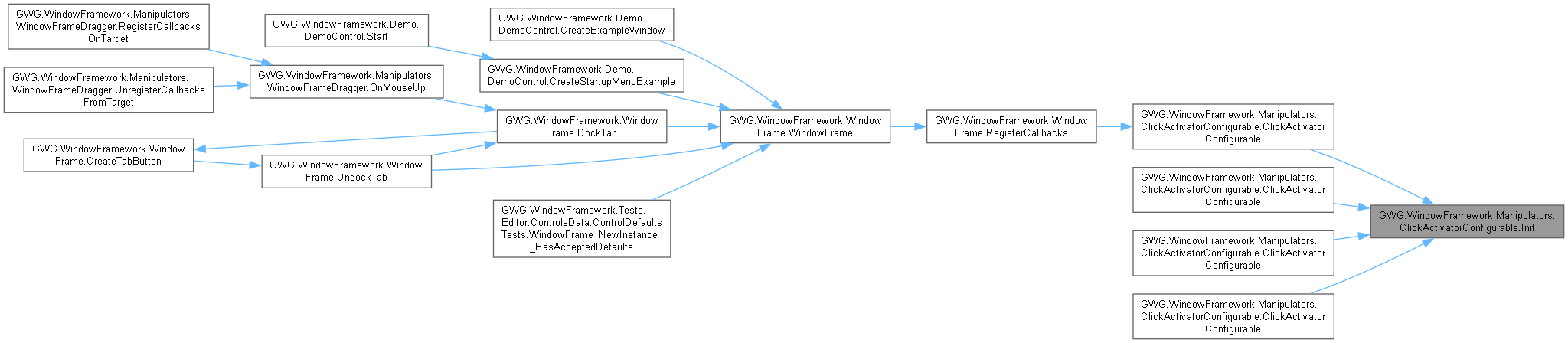
◆ Init()
|
inlineprivate |
Performs common initialization logic for all constructor overloads.
- Parameters
-
clickCount The number of consecutive clicks required for activation button The mouse button that triggers the manipulator action The action to execute when activation criteria are met maxClickDelay Maximum interval in seconds between consecutive clicks maxMoveDistance Maximum pixel distance cursor can travel between clicks
◆ OnMouseDown()
|
inlineprivate |
Handles mouse down events and executes the configured action when activation criteria are met.
- Parameters
-
evt The mouse down event data containing button information, position, and click count
This method is the core event handler that processes mouse input and determines whether to execute the configured action. It performs validation, action execution, and event management in a coordinated sequence:
Validation Process:
- Uses CanStartManipulation() to check if the event matches activation criteria
- Validates mouse button type against the configured button
- Verifies click count matches the required number of clicks
- Ensures the event is appropriate for manipulation
Action Execution:
- Invokes the stored action delegate if it's not null
- Handles null actions gracefully (no operation performed)
- Action is executed immediately when criteria are met
Event Management:
- Stops event propagation to prevent other handlers from processing the same event
- Ensures clean event flow and prevents unintended side effects
- Maintains proper event handling hierarchy
The method provides reliable click detection with proper isolation from other event handlers, making it suitable for complex UI scenarios with multiple overlapping interaction patterns.

◆ RegisterCallbacksOnTarget()
|
inlineprotected |
Registers the mouse down event callback on the target element.
This method is automatically called by Unity's UI Toolkit when the manipulator is added to a target element. It establishes the event handling chain that enables the manipulator to respond to mouse input.
Event Registration:
- Registers a callback for MouseDownEvent
- Uses the default event phase (bubble phase)
- Connects the OnMouseDown method as the event handler
The MouseDownEvent is chosen because it provides the most reliable detection of click events, including proper click count tracking and button identification. The manipulator's activation filters ensure that only relevant events trigger the configured action.

◆ UnregisterCallbacksFromTarget()
|
inlineprotected |
Unregisters the mouse down event callback from the target element during cleanup.
This method is automatically called by Unity's UI Toolkit when the manipulator is removed from a target element or when the element is destroyed. It ensures proper cleanup of event handlers to prevent memory leaks and orphaned callbacks.
Cleanup Operations:
- Removes the MouseDownEvent callback registration
- Breaks the connection between the manipulator and the target element
- Prevents the manipulator from continuing to process events after removal
Proper unregistration is essential for maintaining application performance and preventing unexpected behavior when elements are dynamically created and destroyed during the application lifecycle.

Field Documentation
◆ _action
|
private |
The action delegate that will be executed when the configured click pattern is detected.
This action is invoked when the manipulator detects a mouse click event that matches the configured activation criteria (button type and click count). The action can be null, in which case no operation is performed when the click is detected.
The action is executed immediately when the click pattern is recognized, and event propagation is automatically stopped to prevent other handlers from processing the same mouse event.
◆ _currentClickCount
|
private |
◆ _lastClickPosition
|
private |
◆ _lastClickTimestamp
|
private |
◆ _maxClickDelay
|
private |
◆ _maxMoveDistanceSqr
|
private |
◆ _targetClickCount
|
private |
