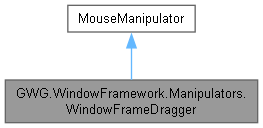
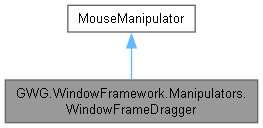
A mouse manipulator that enables drag-and-move functionality for WindowFrame elements in Unity's UI Toolkit. More...
Public Member Functions | |
| WindowFrameDragger () | |
| Initializes a new instance of the WindowFrameDragger with left-click activation. | |
Protected Member Functions | |
| override void | RegisterCallbacksOnTarget () |
| Registers mouse event callbacks on the target element. | |
| override void | UnregisterCallbacksFromTarget () |
| Unregisters mouse event callbacks from the target element. | |
Private Member Functions | |
| Vector2 | GetClampedWindowLocation (float rootX, float rootY, VisualElement _targetWindow) |
| Calculates and enforces position constraints for window movement operations. | |
| void | OnMouseDown (MouseDownEvent e) |
| Handles mouse down events to initiate window dragging operations. | |
| void | OnMouseMove (MouseMoveEvent e) |
| Handles mouse move events to update window position during drag operations. | |
| void | OnMouseUp (MouseUpEvent e) |
| Handles mouse up events to complete window dragging operations. | |
Private Attributes | |
| float | _clickXOffset |
| The horizontal offset between the mouse click position and the window's left edge. | |
| float | _clickYOffset |
| The vertical offset between the mouse click position and the window's top edge. | |
| bool | _isActive |
| Indicates whether a drag operation is currently active. | |
Detailed Description
A mouse manipulator that enables drag-and-move functionality for WindowFrame elements in Unity's UI Toolkit.
This manipulator allows users to click and drag windows to reposition them within the screen boundaries. It respects window locking states and movement permissions while ensuring windows remain visible on screen. The dragger integrates seamlessly with the WindowFrame system to provide smooth, constrained window movement.
Key Features:
- Left-click drag movement from any attached element (typically title bars)
- Respects WindowFrame.Locked and WindowFrame.AllowMove properties
- Keeps windows within screen boundaries during movement
- Maintains proper mouse capture and event handling
- Brings windows to front when dragging begins
- Smooth movement with click offset preservation
Constructor & Destructor Documentation
◆ WindowFrameDragger()
|
inline |
Initializes a new instance of the WindowFrameDragger with left-click activation.
The constructor configures the manipulator to respond only to left mouse button interactions. This prevents conflicts with other mouse operations such as context menus (right-click) or specialized middle-click behaviors.
The manipulator starts in an inactive state and will only begin drag operations when proper mouse down events are received on elements that allow movement.
Member Function Documentation
◆ GetClampedWindowLocation()
|
inlineprivate |
Calculates and enforces position constraints for window movement operations.
- Parameters
-
rootX The requested X position of the mouse cursor rootY The requested Y position of the mouse cursor _targetWindow The VisualElement being moved (typically a WindowFrame)
- Returns
- A Vector2 containing the constrained X (x) and Y (y) position values
This method implements comprehensive position constraint logic to ensure windows remain visible and usable within the screen boundaries:
Position Calculation:
- Converts mouse position to window position using stored click offsets
- Accounts for the difference between cursor location and window origin
Boundary Enforcement:
- Left boundary: Prevents window from moving beyond X = 0
- Top boundary: Prevents window from moving beyond Y = 0
- Right boundary: Ensures window's right edge stays within screen width
- Bottom boundary: Ensures window's bottom edge stays within screen height
The constraints ensure that windows remain fully accessible and cannot be accidentally moved off-screen where they would become difficult to retrieve.

◆ OnMouseDown()
|
inlineprivate |
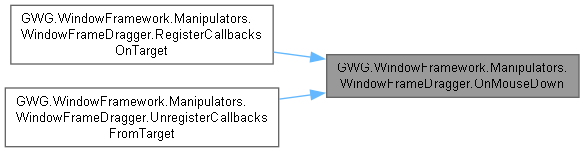
Handles mouse down events to initiate window dragging operations.
- Parameters
-
e The mouse down event data containing click position and button information
This method performs comprehensive validation and setup for drag operations:
Validation Steps:
- Verifies that the manipulation can start (correct mouse button, etc.)
- Locates the parent WindowFrame element
- Checks if the window is locked (Locked property)
- Verifies movement is allowed (AllowMove property)
Setup Operations:
- Brings the target window to the front for better user experience
- Calculates click offsets to maintain cursor-to-window relationship
- Activates the drag state
- Captures mouse input to ensure reliable drag tracking
The method will exit early if any validation fails, ensuring that locked or movement-disabled windows cannot be dragged.
◆ OnMouseMove()
|
inlineprivate |
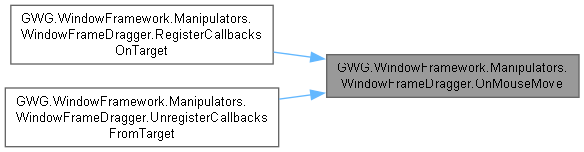
Handles mouse move events to update window position during drag operations.
- Parameters
-
e The mouse move event data containing current cursor position
This method continuously updates the window position while a drag operation is active:
- Validates that the drag operation is active and mouse capture is maintained
- Locates the target WindowFrame element
- Calculates the new window position based on mouse position and stored click offsets
- Applies position constraints through GetClampedWindowLocation()
- Updates the window's top and left style properties
- Stops event propagation to prevent interference with other UI elements
The position calculation uses the stored click offsets to maintain the relative position between the cursor and the window, providing smooth and predictable movement behavior throughout the drag operation.

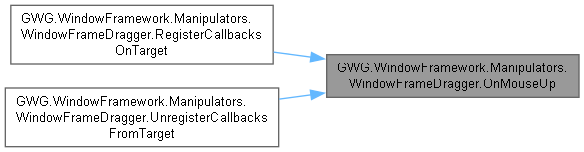
◆ OnMouseUp()
|
inlineprivate |
Handles mouse up events to complete window dragging operations.
- Parameters
-
e The mouse up event data
This method finalizes the drag operation when the user releases the mouse button:
- Validates that an active drag operation exists and can be properly terminated
- Deactivates the drag state to prevent further position updates
- Releases mouse capture to restore normal input handling
- Stops event propagation to maintain clean event flow
After this method completes, the window remains in its new position and normal mouse interaction is fully restored. The drag operation is complete and the window can be interacted with normally or dragged again.
◆ RegisterCallbacksOnTarget()
|
inlineprotected |
Registers mouse event callbacks on the target element.
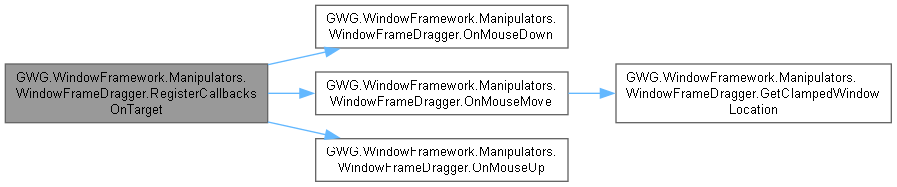
This method is automatically called by the UI Toolkit when the manipulator is added to a target element. It establishes the event handling chain for:
- MouseDownEvent: Initiates drag operations and validates permissions
- MouseMoveEvent: Updates window position during active drag operations
- MouseUpEvent: Completes drag operations and restores normal input
The callbacks are registered to handle events in the appropriate phase to ensure reliable drag behavior even with complex UI hierarchies.
◆ UnregisterCallbacksFromTarget()
|
inlineprotected |
Unregisters mouse event callbacks from the target element.
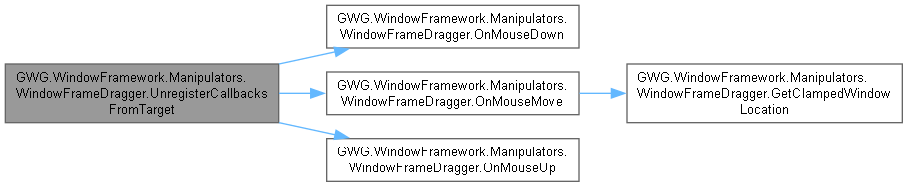
This method is automatically called by the UI Toolkit when the manipulator is removed from an element or when the element is destroyed. It ensures proper cleanup of event handlers to prevent memory leaks.
Unregistration is essential for maintaining application performance and preventing orphaned event handlers from consuming resources or causing unexpected behavior after elements are no longer active.
Member Data Documentation
◆ _clickXOffset
|
private |
The horizontal offset between the mouse click position and the window's left edge.
This offset is calculated when a drag operation begins and maintains the relative position between the cursor and window origin throughout the drag operation. This ensures smooth, predictable movement regardless of where on the draggable element the user initially clicks.
◆ _clickYOffset
|
private |
The vertical offset between the mouse click position and the window's top edge.
This offset is calculated when a drag operation begins and maintains the relative position between the cursor and window origin throughout the drag operation. This ensures smooth, predictable movement regardless of where on the draggable element the user initially clicks.
◆ _isActive
|
private |
Indicates whether a drag operation is currently active.
Set to true when a valid drag operation begins and false when it ends. Used to control event processing and ensure drag operations are properly contained within mouse down/up pairs.